
Integration of Lighting and Blinds with Generic Buttons in nEE
A generic button is a touch field with no factory function. Before it does anything, you program it in the controller, using the iC Tool or the nE2 Link module. Touch Point Light & Blind 2.0 is a panel family that user generic buttons.
Button numbering
Whatever the model, the buttons are always numbered the same way for programming. Learn this grid once and it applies to every panel in both families:
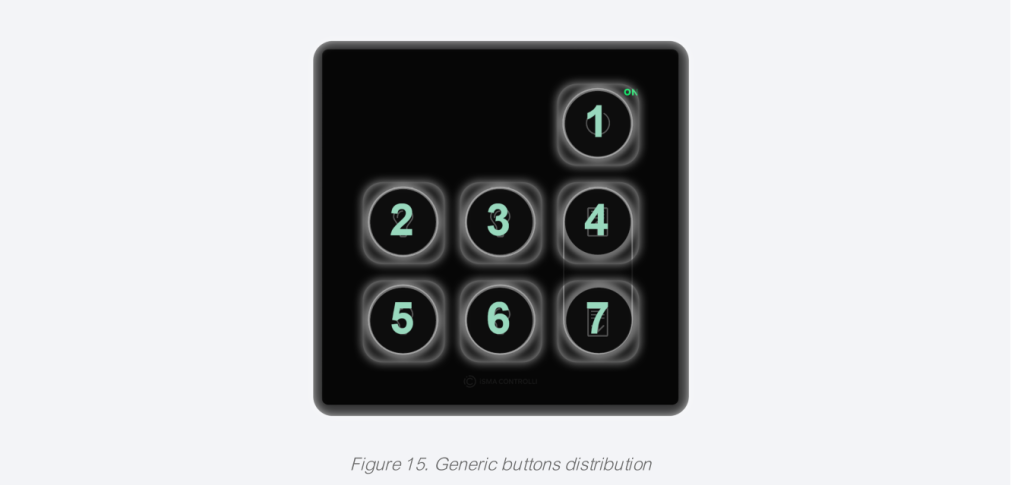
| Panel | Generic buttons | Numbers used |
|---|---|---|
| Touch Point 4L1B 2.0 | 7 | 1, 2, 3, 4, 5, 6, 7 |
| Touch Point ONE 2.0 | 6 | 2, 3, 4, 5, 6, 7 |
| Touch Point 4L 2.0 | 5 | 1, 2, 4, 5, 7 |
| Touch Point ONE 2L / 1B 2.0 | 2 | 4, 7 |
The two panel layouts
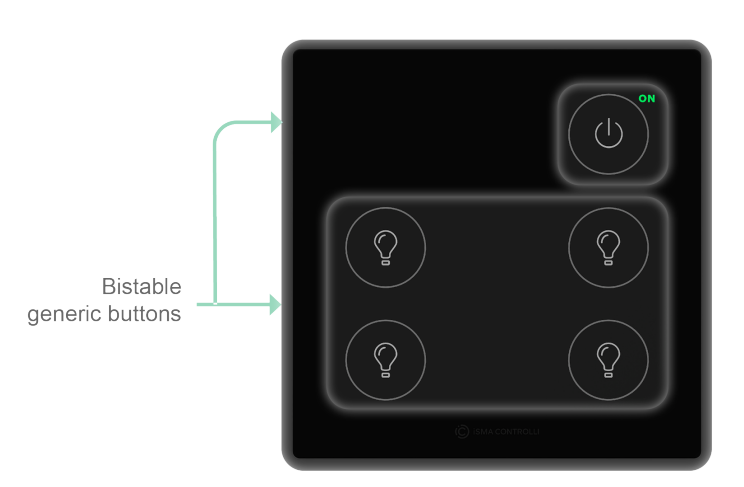
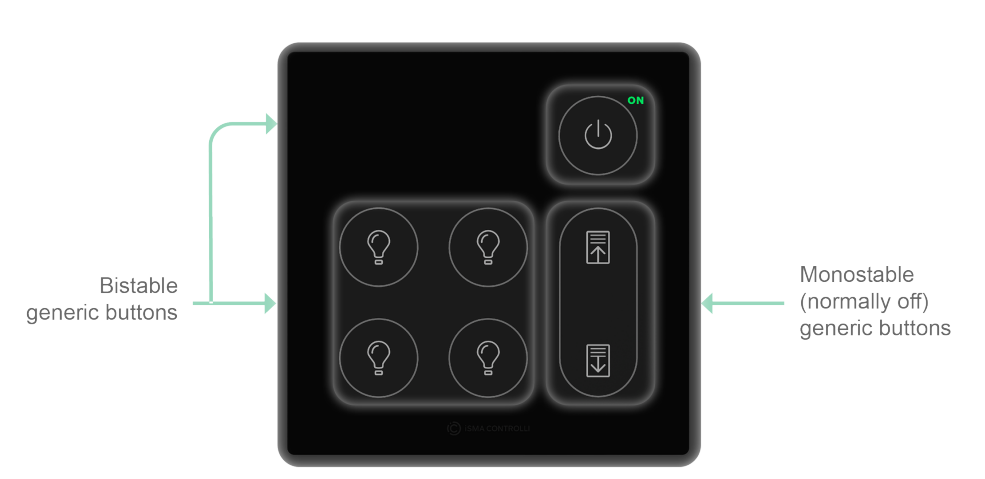
Comparing the two layouts with the numbering grid: on the TP-4L1B-2 the four light bulbs are buttons 2, 3, 5, 6 and the blind up/down pair is 4 and 7. On the TP-4L-2, which has no blind column, the four bulbs are 2, 4, 5, 7.
Operating modes
Every generic button is configured with its own GENERIC_BUTTON_N_MODE parameter, where N is 1–7:
| Value | Mode | Behaviour |
|---|---|---|
| 1 | Disabled | Button function switched off, except for LED BMS control |
| 2 | Blocked | Control from the touch sensor input is blocked |
| 3 | Bistable | Standard latching switch – one press toggles the state |
| 4 | Monostable – normally off | NO switch – the state is high only while the finger is on the field |
| 5 | Monostable – normally on | NC switch – the state is low only while the finger is on the field |
Modbus registers 41342–41348 · BACnet MSV21–MSV27, Present Value
Factory defaults
| Panel | Default mode |
|---|---|
| Touch Point 4L 2.0 | All generic buttons bistable |
| Touch Point 4L1B 2.0 | Light buttons and power button bistable; blind up/down buttons monostable – normally off |
Reading the button states
The panel reports every generic button in one single register. Each button occupies one bit, and each bit holds one of two values:
| Value | State | Meaning |
|---|---|---|
| 0 | Off | Low logic state of the generic button |
| 1 | On | High logic state of the generic button |
Which bit belongs to which button follows the numbering grid above:
| Button | 1 | 2 | 3 | 4 | 5 | 6 | 7 |
|---|---|---|---|---|---|---|---|
| Bit | 0 | 1 | 2 | 3 | 4 | 5 | 6 |
GENERIC_BUTTON_STATES · Modbus register 41349, Decimal: 1348, bits 0–6 · BACnet BV56–BV62
Numeric2Binary in the next topic – the bits have to be separated before anything can use them.Button LEDs
Each generic button has an LED, and you decide where its state comes from:
| Parameter | Value | Meaning |
|---|---|---|
GENERIC_BUTTON_LED_MODESModbus 41350, bits 0–6 · BACnet BV63–BV69 | 0 | LED BMS mode – the LED follows the state written by the controller |
| 1 | LED local mode – the LED follows the button’s own state | |
GENERIC_BUTTON_LED_BMS_STATESModbus 41352, bits 0–6 · BACnet BV70–BV76 | 0 / 1 | The LED state written by the controller when that LED is in BMS mode |