
Lesson Progress
0% Complete
Before anything else, carry over the central idea from Lesson 4:
The generic buttons on a TP-ONE panel have no default logic either. On the
TP-ONE-DISP-2 all six are set to monostable – normally off from the factory. Everything the user experiences as a menu, a light level or a blind movement is produced by TpOneControlLogic in the controller.The button layout
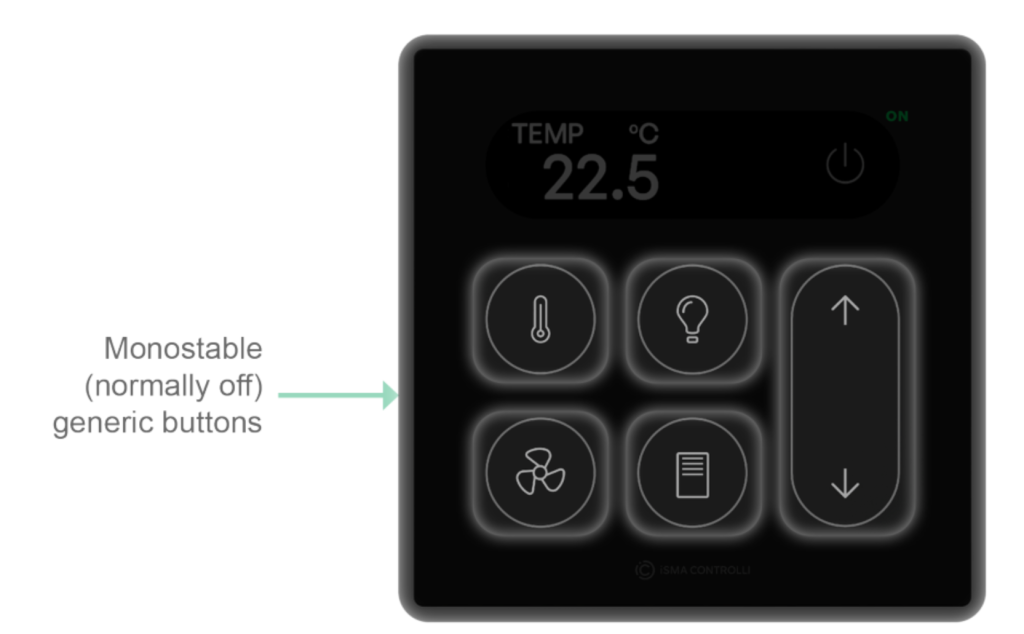
Using the numbering grid from Lesson 4 – which is identical for every panel with generic buttons – the six fields of the TP-ONE-DISP-2 map like this:
| No. | Icon | Role in the default logic |
|---|---|---|
| 2 | Thermometer | Select the temperature setpoint screen |
| 3 | Light bulb | Select a lighting channel |
| 4 | Arrow up | Increase / switch on / raise |
| 5 | Fan | Select the fan screen |
| 6 | Blinds | Select the blinds screen |
| 7 | Arrow down | Decrease / switch off / lower |
Button 1 – the power button in the top-right corner – is the occupancy button on TP-ONE, not a generic button. That is why the panel has six generic buttons, numbered 2 to 7, and not seven.
How the menu works
The panel does not have a light button per lamp. It has one screen at a time, and the menu button steps between them. The active screen is the value of SCREEN_SELECT_MODE, which the controller writes:
| Value | Screen |
|---|---|
| 1 | Standard display loop |
| 2–5 | Fan 0, fan 1, fan 2, fan 3 |
| 6 | Fan auto |
| 7–10 | Light 1, light 2, light 3, light 4 |
| 11–14 | Blind 1, blind 2, blind 3, blind 4 |
| 15 | Temperature setpoint |
SCREEN_SELECT_MODE · Modbus register 40325, address slot 324
This register is the clearest answer to “how do I reach light 3?”. The user selects a screen, then acts on it with the up/down buttons.
Gestures
| Area | Gesture | Result |
|---|---|---|
| Setpoint | Tap − / + | Setpoint changes by 0.5 °C (default step) |
| Fan | Tap | Next fan speed / AUTO |
| Lighting | Tap and release | Light ON / OFF |
| Lighting | Tap and hold | Dim the light while held |
| Blinds | Tap and release | Continuous operation to the end position |
| Blinds | Tap and hold | Move & stop – moves while held, stops on release |
| Power button | Tap | Switches occupancy on / off (can be disabled) |
As on the Light & Blind panels, the panel itself sends only an on/off state per button; the short press (70–400 ms) and long press (400 ms – 11 s) are separated by the logic in the controller.