
Lesson 3,
Topic 5
In Progress
Touch Point with the ZAC24-IP-D
Lesson Progress
0% Complete
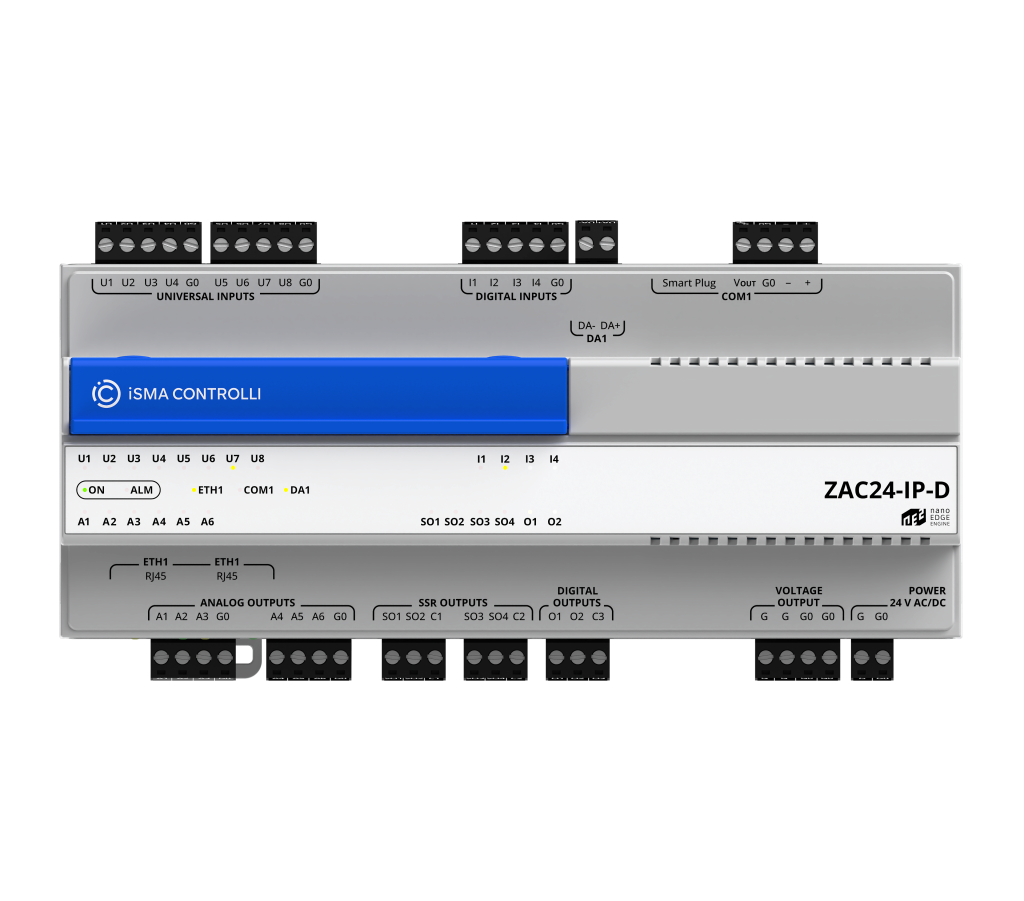
The ZAC24-IP-D is a nano EDGE ENGINE zone controller with a DALI-2 interface. Where the RAC18-IP serves a single room, the ZAC24-IP-D serves a zone – several rooms, with comfort, lighting and blinds handled by one controller.
Why it matters for Touch Point
- Up to 10 TP 2.0 panels can be daisy-chained to a single ZAC24-IP-D.
- The controller has a dedicated Smart Plug terminal next to COM1, so the panel chain connects without an adapter.
- The DALI-2 interface makes it the natural controller for the TP-ONE and TP Light & Blind applications covered in the next lessons.
- Because it runs the nano EDGE ENGINE, the engineering workflow is identical to the RAC18-IP.
Adding a Touch Point panel to a ZAC24-IP-D application
- Wire the panel chain to the Smart Plug terminal of the controller.
- Configure each panel with the iSMA Configurator – protocol, unique address, baud rate (Lesson 2).
- Open the controller application and add the communication network and the panel components.